Mobile Platform Integration Guidelines
1 CrashSight Integration on Mobile Devices
2 iOS SDK Integration
2.1 CocosPods Integration
-
Add the pod 'CrashSight' to the Podfile
-
Run pod install or pod update command
-
Enter the project from the .xcworkspace file (not the .xcodeproj file)
2.2 Manual Integration
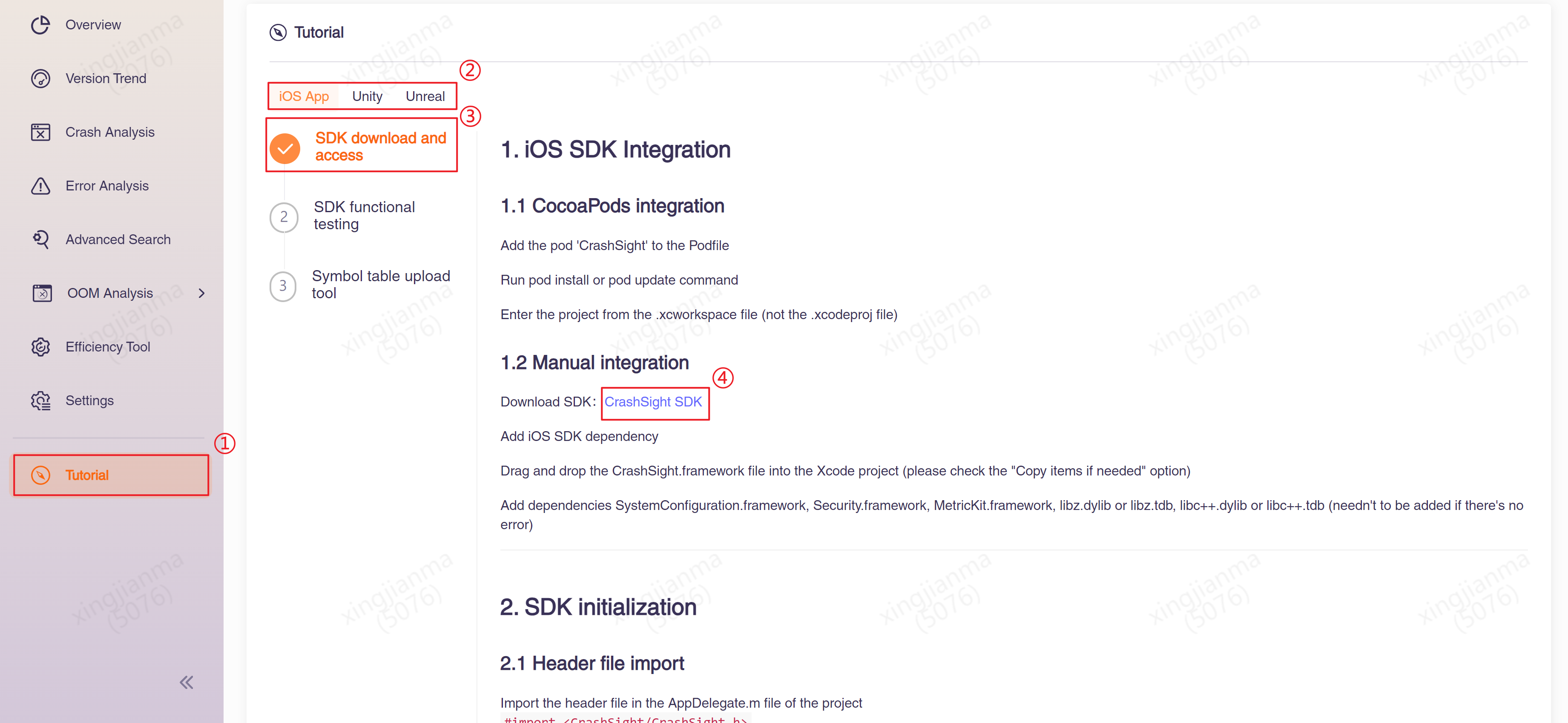
- After creating a project on the platform, the SDK that matches the platform and engine of the project can be downloaded from the "Tutorial" in the sidebar, as shown in the figure below:
- Add iOS SDK Dependencies
- Drag the CrashSight.framework file into the Xcode project (Select "Copy items if needed")
- Add dependency library
- libc++.dylib or libc++.tdb is for importing the c++ standard library.
- libz.dylib or libz.tdb is for compressing reported data
- Security.framework is for storing keychain
- SystemConfiguration.framework is for reading system info in case of an exception
- MetricKit.framework is for obtaining app diagnostic information provided by apple (weak reference, please select “optional”).
- OSLog.framework is for getting the NSLog log information (weak reference, please select “optional”).
- CFNetwork.framework is for getting VPN status.
2.3 SDK Initialization
2.3.1 Objective-C Initialization
-
Import header file
#import <CrashSight/CrashSight.h>in the project's AppDelegate.m file -
Initialization: Initialize in the
application:didFinishLaunchingWithOptions:
method of the project's AppDelegate.m file
CrashSightConfig* config = [[CrashSightConfig alloc] init];
//  Customize the domain name for reporting (optional)
config.crashServerUrl = @"https://ios.crashsight.wetest.net/pb/sync";
config.debugMode = true;//open debug mode
NSString* appId = @"appId";
[CrashSight startWithAppId:appId config:config];
2.3.2 Swift Initialization
- If there is no Objective-C Bridging Header in the project, create one. · Create a new .h file · Find Build Settings->Swift Compiler-General->Objective-C Bridging Header, fill in the path of the .h file you just created
- Import header file
#import <CrashSight/CrashSight.h>in the project's Objective-C Bridging Header - Initialize in XXXApp.swift
@main
struct XXXApp: App {
    init() {
            let config = CrashSightConfig();
            config.crashServerUrl = "https://ios.crashsight.wetest.net/pb/sync";
            config.debugMode = true;
            let appId = "appId";
            CrashSight.start(withAppId:appId,config:config);
    }
...
Domain name for reporting
- Local(China) public cloud https://ios.crashsight.qq.com/pb/sync
- International public cloud https://ios.crashsight.wetest.net/pb/sync
2.4 Integration Result Testing
After initializing CrashSight, verify integration by triggering a crash manually (native iOS SDK has no test API; Unity/UE plugins may use CrashSightAgent.TestOcCrash()):
int* a = NULL;
a[10000] = 5;
- a. Enable Debug mode. Initialize CrashSight and assign suitable config parameters
- b. Network and report: Check if “begin to upload < CSAnalyticsLogic” or “cmd: 641” is printed in the test device log
- c. Crash detection: Check if “Handle the crash scene in callback” is printed in the test device log
- d. Report exceptions: Check if “begin to upload < CSCrashLogic” or “cmd: 631” is printed in the test device log
3 iOS Interfaces
3.1 Initialize CrashSight with Specified Configurations
Class:CrashSight
Method:+ (void)startWithAppId:(NSString * CS_NULLABLE)appId
     developmentDevice:(BOOL)development
                config:(CrashSightConfig * CS_NULLABLE)config;
| Parameter | Type | Note |
|---|---|---|
| appid | NSString * | The appid obtained from the CrashSight backend |
| development | BOOL | Whether it is a development device |
| config | CrashSightConfig * | See CrashSightConfig.h header file for details |
3.2 Set User ID
Class:CrashSight
Method:+ (void)setUserIdentifier:(NSString *)userId;
| Parameter | Type | Note |
|---|---|---|
| userId | NSString * | User ID |
3.3 Set App Version Info
Class:CrashSight
Method:+ (void)updateAppVersion:(NSString *)version;
Note: Update the application version. The SDK can read the version from Info.plist ({CFBundleShortVersionString}.{CFBundleVersion}) automatically; no need to set it before initialization.
| Parameter | Type | Note |
|---|---|---|
| version | NSString * | App Version |
3.4 Set Key Data, Reported with Crash Info
Note: Set the Key-Value data customized by the user. It will be reported together with exception info when sending the crash. Each key shouldn't exceed 100 characters, each value shouldn't exceed 1000 characters, and the total length (all keys+all values) shouldn't exceed 128KB.
View page: Crash Details->Download Attachments->CustomizedData.txt
Class:CrashSight
Method:+ (void)setUserValue:(NSString *)value
              forKey:(NSString *)key;
| Parameter | Type | Note |
|---|---|---|
| key | NSString * | Key |
| value | NSString * | Value |
3.5 Set Scene Marks
Class:CrashSight
Method:+ (void)setUserSceneTag:(NSString *)userSceneTag;
| Parameter | Type | Note |
|---|---|---|
| userSceneTag | NSString * | Scene Mark |
3.6 Report Custom Errors
Class:CrashSight
Method:+ (void)reportExceptionWithCategory:(NSUInteger)category
                               name:(NSString *)aName
                             reason:(NSString *)aReason
                          callStack:(NSArray *)aStackArray
                          extraInfo:(NSDictionary *)info
                       terminateApp:(BOOL)terminate
                       dumpDataType:(int) dumpDataType
                errorAttachmentPath:(NSString *)errorAttachmentPath;
| Parameter | Type | Note |
|---|---|---|
| category | NSUInteger | Error type: Cocoa=3, CSharp=4, JS=5, Lua=6 |
| aName | NSString * | Name |
| aReason | NSString * | Error cause |
| aStackArray | NSArray * | Stack |
| info | NSDictionary * | Additional data |
| terminate | BOOL | Whether to quit application process after reporting |
| dumpDataType | int | Native stack dump type: 0 off, 1 system dump, 3 minidump (mobile) |
| errorAttachmentPath | NSString | Absolute path to attachment; may be nil |
Class:CrashSight
Method:+ (void)reportExceptionWithCategory:(NSUInteger)category
                               name:(NSString *)aName
                             reason:(NSString *)aReason
                          callStack:(NSArray *)aStackArray
                          extraInfo:(NSDictionary *)info
                       terminateApp:(BOOL)terminate
                       dumpDataType:(int) dumpDataType
                errorAttachmentPath:(NSString *)errorAttachmentPath
                             option:(CSExceptionReprotOption)option;
Note: Adds option to choose which extra data this report collects. 0 collects none of them. The older method collects system log, custom log, custom KV, and the user callback. Bits match CSExceptionReprotOption used by jank reporting: system log, custom log, KV, callback, and auto dump.
View page:
info: Crash Details->Download Attachments->extraMessage.txt
3.7 Set Reporting Log Level
Class:CrashSightLog
Method:+ (void)initLogger:(CrashSightLogLevel) level consolePrint:(BOOL)printConsole;
| Parameter | Type | Note |
|---|---|---|
| level | CrashSightLogLevel | Minimum reporting log level |
| printConsole | BOOL | Whether to print at the console |
3.8 Custom Reporting Log
Note: Shouldn't exceed 30KB.
Class:CrashSightLog
Method:+ (void)level:(CrashSightLogLevel) level log:(NSString *)format, ... NS_FORMAT_FUNCTION(2, 3);
| Parameter | Type | Note |
|---|---|---|
| level | CrashSightLogLevel | Log level |
| format | NSString * | Log format |
| ... | Variadic parameter |
3.9 Set Exception Callback
Class:CrashSightDelegate
Proxy property:delegate
Proxy protocol:CrashSightDelegate
Proxy protocol method:- (NSString * CS_NULLABLE)attachmentForException:(NSException * CS_NULLABLE)exception callbackType:(CSCallbackType)callbackType;
Note: The result returned by proxy protocol method will be reported along with the exception View page: Crash Details->Download Attachments->CrashAttach.log
callback type comparison table:
| callback type | exception type |
|---|---|
| 0 | Java crash |
| 2 | Native crash |
| 3 | c# exception |
| 4 | ANR |
| 5 | JS exception |
| 6 | lua exception |
| 8 | custom error |
3.10 Report jank
Class:CrashSight
Method:+ (void)reportJankWithName:(NSString *)name
                     message:(NSString *)message
                       stack:(NSArray *)stack
                   extraInfo:(NSDictionary *)extraInfo
                      option:(CSExceptionReprotOption)option
              attachmentPath:(NSString *)attachmentPath;
Note: Report jank proactively.
| Parameter | Type | Note |
|---|---|---|
| name | NSString * | Exception name |
| message | NSString * | Exception message |
| stack | NSArray * | Stack |
| extraInfo | NSDictionary * | Extra info |
| option | CSExceptionReprotOption | Bit flags (5 bits only): SystemLog(1), CustomLog(2), KV(4), Callback(8), DumpStack(16) |
| attachmentPath | NSString * | Attachment absolute path; may be nil |
3.11 Report stuck (ANR-like)
Class:CrashSight
Method:+ (void)reportStuckWithThreadIndex:(int)threadIndex
                            maxChecks:(int)maxChecks
                        checkInterval:(NSTimeInterval)checkInterval
                                 name:(NSString *)name
                              message:(NSString *)message
                            extraInfo:(NSString *)extraInfo
                       dumpNativeType:(int)dumpNativeType
                           attachPath:(NSString *)attachPath;
Note: Report thread stuck.
| Parameter | Type | Note |
|---|---|---|
| threadIndex | int | Target thread index |
| maxChecks | int | Max check count |
| checkInterval | NSTimeInterval | Check interval |
| name | NSString * | Exception name |
| message | NSString * | Exception message |
| extraInfo | NSString * | Typically a JSON string |
| dumpNativeType | int | 0 off, 1 system dump, 3 minidump |
| attachPath | NSString * | Attachment absolute path; may be nil |
3.12 Set crash attachment path
Class:CrashSight
Method:+ (void)setAttachmentPath:(NSString *)path;
Note: Absolute path of an attachment file for crash reports. Call after initialization.
3.13 Set OOM attachment path
Class:CrashSightConfig
Property:@property (nonatomic, copy) NSString *oomAttchmentFilePath;
Note: Absolute path of the log file attached to an OOM report. Set it on the CrashSightConfig passed to startWithAppId:config: before that call. The upload looks up the path read during this launch; changing it after initialization does not apply to that upload. The property name is oomAttchmentFilePath.
3.14 Enable page tracing
Class:CrashSight
Method:+ (void)enableDetailedPageTracing:(bool)enable;
Note: When enabled, collects page visit traces attached to crash reports. Can be toggled explicitly; default may also be controlled by remote config.
3.15 Memory near limit callback
Class:CrashSight
Method:+ (void)setMemoryNearLimitCallback:(void(^)(uint64_t footprint, uint64_t memoryLimit))callback
               memoryThresholdBytes:(uint64_t)memoryThresholdBytes
                   memoryLimitBytes:(int64_t)memoryLimitBytes
                timeIntervalSeconds:(NSTimeInterval)timeIntervalSeconds;
Note: Fires when footprint approaches the memory limit. iOS 13+ only, requires OOM monitoring enabled. memoryLimitBytes of -1 uses the system limit (footprint + os_proc_available_memory()). A value >= 0 is used as the limit directly. timeIntervalSeconds of 0 fires only once. Pass nil to unregister.
3.16 Current report UUID
Class:CrashSight
Method:+ (NSString *)getCrashUUID;
Note: Returns the UUID of the crash currently being reported. Usually called from the crash callback to correlate this report. Returns empty when reporting has not started.
3.17 Get a thread stack
Class:CrashSight
Method:+ (BOOL)getStackTraceWithTid:(int)tid buffer:(char *)buffer length:(size_t)length;
Note: Writes the stack of a thread into buffer. tid of -1 is the current thread. Also accepts a pthread tid, a Mach port, or a thread index. Returns YES when a non-empty stack was written.
4 Android SDK Integration
The CrashSight Android SDK integration process is as follows:

4.1 Maven Integration
a. Add Tencent maven mirror to the project's build.gradle (below Gradle 7.0) :
allprojects {
    repositories {
        maven {
            url "https://mirrors.tencent.com/nexus/repository/maven-public"
        }
    }
}
If using Gradle 7.0 or above, add to setting.gradle:
dependencyResolutionManagement {
    repositories {
        maven {
            url "https://mirrors.tencent.com/nexus/repository/maven-public"
        }
    }
}
b. Add dependencies to the build.gradle module:
dependencies {
    implementation 'net.crashsight:crashsight-android:4.3.14.1107'
}
4.2 Manual Integration
After creating a project on the platform, the SDK that matches the platform and engine of the project can be downloaded from the "Tutorial" in the sidebar, as shown in the figure below:

- If your project has Native code (C/C++) or has other third-party shared libraries integrated, it's recommended to download CrashSight's NDK dynamic library. CrashSight NDK contains shared libraries of various architecture:
- armeabi-v7a
- arm64-v8a
- x86
- x86_64
When integrating CrashSight shared libraries, please only keep shared libraries with supported architecture.
Eclipse Project
-
Copy the CrashSight library file to the project's libs directory.
-
Refresh the project.
-
Add project dependency: Right-click the JAR file of CrashSight and add it to compilation path.
Android Studio Project
- Copy the CrashSight library file to the project's libs directory.
- To integrate CrashSight NDK, add shared library directory configurations to Module's build.gradle file.
android {
    sourceSets {
        main.jniLibs.srcDirs = ['libs']
    }
}
- Click Sync to sync configurations.
To improve readability of APP Crash stack, it's recommended to configure symbol table file to better locate issues:
- Java-only projects: Just configure the Mapping file generated after obfuscation.
- Projects containing Native code: it's recommended to configure the Symbol symbol table file extracted by symbol table tools from Debug SO. CrashSight supports manual and auto configurations. For detailed configuration process, please see: "CrashSight Symbol Table Configurations for Android"
4.3 Parameter Config
- Add permissions to AndroidManifest.xml:
<uses-permission android:name="android.permission.INTERNET" />
<uses-permission android:name="android.permission.ACCESS_NETWORK_STATE" />
<uses-permission android:name="android.permission.ACCESS_WIFI_STATE" />
Note: If you are going to release the app on Google Play Store, you need to block or remove the READ_PHONE_STATE permission, or the app may be removed from the store.
- Please don't obfuscate CrashSight. Add the following configurations to the ProGuard obfuscation file:
-dontwarn com.uqm.crashsight.**
-keep public class com.uqm.crashsight.**{*;}
4.4 Simple Initialization
Obtain APP ID and copy the following code to onCreate() of the project's Application class. CrashSight will automatically detect the environment and finish configurations. (Since 4.3.8.1063, Android initialization runs synchronously on the main init path; still call from Application.onCreate on the main thread.)
// Set reporting address
CrashReport.setServerUrl(serverUrl);
//Initialization
CrashReport.initCrashReport(getApplicationContext(), "注册时申请的APPID", false);
The third parameter is the switch of SDK debugging mode. Features of the debugging mode's operation include:
- Outputs detailed CrashSight SDK log.
- All crashes are reported right away.
- Custom log will be output in Logcat.
- Disable error merging, all errors will be reported separately.
You're recommended to set it as true during tests, and as false upon release.
Reporting Address
- Local(China) public cloud https://android.crashsight.qq.com/pb/async
- International public cloud https://android.crashsight.wetest.net/pb/async
4.5 Notes on MultiDex
If MultiDex is used, it's recommended to put CrashSight's class into the main Dex through Gradle's "multiDexKeepFile" config or other means. In addition, you're recommended to manually load sub-Dex in the "attachBaseContext" method of Application class.
public class MyApplication extends SomeOtherApplication {
  @Override
  protected void attachBaseContext(Context base) {
     super.attachBaseContext(context);
     Multidex.install(this);
  }
}
4.6 Configuring native library extraction
Unextracted native libraries may cause crash stack cannot be symbolicated. This is manifested by the fact that the crash module in the stack is xx.apk instead of xx.so and cannot be localized to a specific library. In order to avoid the impact of unextracted native libraries on the stack symbolication, please do the following configuration:
- Configure android:extractNativeLibs="true" in AndroidManifest.xml when packaging the APK.
<application
    ...
    android:extractNativeLibs="true">
- When packaging AAB, locate the gradle.properties file in the project root directory and add the following to it:
enableUncompressedNativeLibs = false
By adding this parameter, the operating system can provide additional information in the event of an application crash to help analyze the cause of the crash.
4.7 Integration Result Testing
Now you can cause a crash (triggering it with "keys" is recommended) to see CrashSight's capabilities. After initializing CrashSight, call CrashSight to test the Java Crash interface.
CrashReport.testJavaCrash();
When executing this code, a crash will happen. The output of Logcat's TAG=CrashSightReport is:

Now you can see the Crash issue just triggered on the "Crash" page (usually delayed by no more than 10s). If the project contains a Native project or uses code obfuscation, you're recommended to configure a symbol table file.
4.8 Enable Javascript's Exception Detection Feature
CrashSight Android SDK 4.2.12 and above versions offer Javascript exception detection and reporting features for developers to detect Javascript exceptions occurring in WebView.
/**
* Set Javascript exception monitoring
*
* @param webView: specify the webView to monitor
* @param autoInject: whether to inject crashsight.js file automatically
* @return true: successfully set; false: failed to set
*/
CrashReport.setJavascriptMonitor(WebView webView, boolean autoInject)
- The "crashsight.js" file is in the CrashSight SDK and can be embedded manually via HTML.
- When auto SDK integration is used, you can choose between auto injection and manual injection. To use auto integration + manual injection, you need to download the "crashsight.js" file.
- Because versions lower than Android 4.4 have a flawed deflect mechanic, the interface only works in Android 4.4 and higher versions by default.
- The interface doesn't configure WebViewClient and Listener of webView.
- The interface enables webView's JS executing capabilities by default.
If non-standard Android WebView is used (such as one with a X5 core), it needs to be used like below:
CrashReport.WebViewInterface webView = new CrashReport.WebViewInterface() {
    /**
     * Obtain WebView URL.
     *
     * @return WebView URL
     */
    @Override
    public String getUrl() {
        // The following is for demonstration only. Please use real logics in real-life scenarios
        return <third-party WebView object>.getUrl();
    }

    /**
     * Activate JavaScript.
     *
     * @param flag true means activated; false means deactivated
     */
    @Override
    public void setJavaScriptEnabled(boolean flag) {
        // The following is for demonstration only. Please use real logics in real-life scenarios
        WebSettings webSettings = <third-party WebView object>.getSettings();
        webSettings.setJavaScriptEnabled(flag);
    }

    /**
     * Load URL.
     *
     * @param url URL to be loaded
     */
    @Override
    public void loadUrl(String url) {
        // The following is for demonstration only. Please use real logics in real-life scenarios
        <third-party WebView object>.loadUrl();
    }

    /**
     * Add JavaScript interface object.
     *
     * @param jsInterface JavaScript interface object
     * @param name JavaScript interface object name
     */
    @Override
    public void addJavascriptInterface(H5JavaScriptInterface jsInterface, String name) {
        // The following is for demonstration only. Please use real logics in real-life scenarios
        <third-party WebView object>.addJavascriptInterface(jsInterface, name);
    }

    /**
     * Obtain content description of WebView.
     *
     * @return Content description of WebView.
     */
    @Override
    public CharSequence getContentDescription() {
        // The following is for demonstration only. Please use real logics in real-life scenarios
        return <third-party WebView object>.getContentDescription();
    }
};
// Just import the WebView interface object created when calling CrashSight to set the JS exception detection interface
4.8.1 Auto Injection
It's recommended to call the interface with the onProgressChanged function of WebChromeClient.
CrashReport.setJavascriptMonitor(webView, true);
Example:
WebView webView = new WebView(this);
// Set WebChromeClient
webView.setWebChromeClient(new WebChromeClient() {
    @Override
    public void onProgressChanged(WebView webView, int progress) {
        // Add Javascript exception monitoring
        CrashReport.setJavascriptMonitor(webView, true);
        super.onProgressChanged(webView, progress);
    }
});
// Load HTML
webView.loadUrl(url);
4.8.2 Manual Injection
Download crashsight.js file and add it to the HTML where Javascript exception monitoring is needed:
<html>
  <script src="crashsight.js" ></script>
<body>
    ...
</body>
</html>
After WebView has loaded the HTML, configure Javascript's exception detection feature:
WebView webView = new WebView(this);
// Load HTML
webView.loadUrl(url);
// Add Javascript exception monitoring
CrashReport.setJavascriptMonitor(webView, false);
After CrashSight Android SDK has detected a Javascript exception, the following info will be reported by default:
- Android device info;
- Javascript exception stack and other info;
- Java stack;
- WebView info, which only includes ContentDescription at present.
5 Android Interfaces
5.1 Error Reporting
public static void postException(int category, String errorType, String errorMsg, String stack, Map<String, String> extraInfo)
Note: Active reporting of error info
| Parameter | Type | Note |
|---|---|---|
| category | int | Exception type, C#: 4, js: 5, lua: 6 (For Java error reporting, you can use 4) |
| errorType | String | Exception Name |
| errorMsg | String | Exception Info |
| stack | String | Stack |
| extraInfo | Map<String, String> | Other Info |
View page:
extraInfo: Crash Details->Download Attachments->extraMessage.txt
5.1.1 Report error with attachment
public static void postException2(int category, String errorType, String errorMsg, String stack,
                                  String extraInfoJsonStr, int dumpNativeType, String errorAttachmentPath)
Note: Extends postException with JSON extraInfo, native dump type, and attachment path.
| Parameter | Type | Note |
|---|---|---|
| category | int | Exception type (same as postException) |
| errorType | String | Exception name |
| errorMsg | String | Exception message |
| stack | String | Stack |
| extraInfoJsonStr | String | Extra info as JSON string |
| dumpNativeType | int | 0 off, 1 system dump, 3 minidump |
| errorAttachmentPath | String | Attachment absolute path; may be null |
public static void postException2(int category, String errorType, String errorMsg, String stack,
                                  String extraInfoJsonStr, int dumpNativeType, String errorAttachmentPath,
                                  int reportInfoOption)
Note: Adds reportInfoOption. 0 collects none of the extra data. The older method collects system log, custom log, custom KV, the user callback, and all-thread Java stacks (not the reserved auto-dump bit).
| Bit | Meaning |
|---|---|
| 1 | System log |
| 2 | Custom log |
| 3 | Custom KV |
| 4 | User callback |
| 5 | Auto dump (reserved) |
| 6 | All-thread Java stacks |
5.2 Set User ID
public static void setUserId(String userId)
Note: Set User ID. Please call it after initialization.
| Parameter | Type | Note |
|---|---|---|
| userId | String | UserID |
5.3 Mark a Scene
public static void setUserSceneTagStr(String userSceneTagStr, boolean upload)
public static void setUserSceneTagStr(Context context, String userSceneTagStr, boolean upload)
Note: Set scene tag string. When upload is true, reports the scene change immediately (requires initialization and remote config).
| Parameter | Type | Note |
|---|---|---|
| userSceneTagStr | String | Scene tag |
| upload | boolean | Upload immediately |
5.4 Add Custom Data
public static void putUserData(Context context, String key, String value)
Set the Key-Value data customized by the user. It will be reported together with exception info when sending the crash. Each key shouldn't exceed 100 characters, each value shouldn't exceed 1000 characters, and the total length (all keys+all values) shouldn't exceed 64KB. Supports use in callbacks.
View page:
Crash Details->Download Attachments->valueMapOthers.txt
| Parameter | Type | Note |
|---|---|---|
| key | String | Key |
| value | String | Value |
5.5 Custom Log
import com.uqm.crashsight.crashreport.CrashSightLog;

Verbose level log:

public static void v(String tag, String content)

Debug level log

public static void d(String tag, String content)

info level log

public static void i(String tag, String content)

warn level log

public static void w(String tag, String content)

error level log

public static void e(String tag, String content)
Note: The custom log shouldn't exceed 30KB. Android does not support writing custom logs in crash callbacks.
| Parameter | Type | Note |
|---|---|---|
| tag | String | Tag |
| content | String | Content |
5.6 Set Callback
Note: Set the callback function for crash and error reporting.
View page:
onCrashHandleStart: Crash Details->Download Attachments->extraMessage.txt
onCrashHandleStart2GetExtraDatas: Crash Details->Download Attachments->userExtraByteData
CrashReport.UserStrategy strategy = new CrashReport.UserStrategy(MainActivity.this);
// Set CrashSight callback
strategy.setCrashHandleCallback(new CrashReport.CrashHandleCallback() {
    /**
      * Customize the crash callback for info reporting
      *
      * @param crashType     Error type: CRASHTYPE_JAVA, CRASHTYPE_NATIVE, CRASHTYPE_U3D, CRASHTYPE_ANR
      * @param errorType     Error type name
      * @param errorMessage  Error message
      * @param errorStack    Error stack
      * @return Return extra custom info reporting
      */
    @Override
    public synchronized Map<String, String> onCrashHandleStart(int crashType, String errorType, String errorMessage, String errorStack) {
        // Obtain custom info Map of parent class
        Map<String, String> userDatas = super.onCrashHandleStart(crashType, errorType, errorMessage, errorStack);
        if (userDatas == null) {
            userDatas = new HashMap<>();
        }
        for (String k : extraMap.keySet()) {
            userDatas.put(k, extraMap.get(k));
        }
        return userDatas;
    }

    /**
      * Crash callback of binary info reporting
      *
      * @param crashType     Error type: CRASHTYPE_JAVA, CRASHTYPE_NATIVE, CRASHTYPE_U3D, CRASHTYPE_ANR
      * @param errorType Error type name
      * @param errorMessage Error message
      * @param errorStack Error stack
      * @return byte[] Report extra binary content
      */
    @Override
    public byte[] onCrashHandleStart2GetExtraDatas(int crashType, String errorType, String errorMessage, String errorStack) {
        return "test onCrashHandleStart2GetExtraDatas".getBytes();
    }
});
CrashReport.initCrashReport(MainActivity.this, appId, true, strategy);
callback type comparison table:
| callback type | exception type |
|---|---|
| 0 | Java crash |
| 2 | Native crash |
| 3 | c# exception |
| 4 | ANR |
| 5 | JS exception |
| 6 | lua exception |
| 8 | custom error |
5.7 Report jank
public static void postJank(int category, String errorType, String errorMsg, String stack,
                          String extraInfoJsonStr, int reportInfoOption, String jankAttachmentPath)
Note: Report jank proactively.
| Parameter | Type | Note |
|---|---|---|
| category | int | Exception type (same as postException, e.g. C#=4) |
| errorType | String | Exception name |
| errorMsg | String | Exception message |
| stack | String | Stack |
| extraInfoJsonStr | String | Extra info as JSON string |
| reportInfoOption | int | Bit flags: bits 1–5 match iOS CSExceptionReprotOption; bit 6 (all Java thread stacks) is Android only |
| jankAttachmentPath | String | Attachment path; may be null |
5.8 Report stuck
public static void postStuck(int threadId, int maxChecks, long checkInterval,
                             String name, String message, String extraInfo,
                             int dumpNativeType, String attachPath)
Note: Report thread stuck.
| Parameter | Type | Note |
|---|---|---|
| threadId | int | Target thread ID |
| maxChecks | int | Max check count |
| checkInterval | long | Check interval in milliseconds |
| name | String | Exception name |
| message | String | Exception message |
| extraInfo | String | Typically a JSON string |
| dumpNativeType | int | 0 off, 1 system dump, 3 minidump |
| attachPath | String | Attachment path; may be null |
5.9 Set crash attachment path
public static void setLogPath(String logPath)
Note: Absolute path of an attachment file for crash reports. Call after initialization.
5.10 Set OOM attachment path
public static void setOomLogPath(String logPath)
Note: Absolute path of a log file attached to OOM reports. Call before initialization. The upload looks up the path read during this launch; setting it after initialization does not apply to that upload.
5.11 Fragment page tracing
public static void setEnableFragmentCallbacks(boolean enable)
public static void updateFragmentTracing(String name, String function)
Note: Call setEnableFragmentCallbacks(true) first; invoke updateFragmentTracing(fragmentName, methodName) from Fragment lifecycle callbacks to record page paths.
| Parameter | Type | Note |
|---|---|---|
| enable | boolean | Whether to enable Fragment callback tracing |
| name | String | Fragment name |
| function | String | Lifecycle / method name |
5.12 Current report UUID
public static String getCrashUUID()
Note: Returns the UUID of the crash currently being reported. Returns an empty string when reporting has not started.
5.13 Get a thread stack
public static String getStackTrace(int tid)
Note: Returns the native stack of a thread. tid of -1 is the current thread (Linux tid). Returns an empty string on failure. Call after initialization.